Icon of program: Home Design 3D

Home Design 3D for Windows

  • Paid
  • 3.6
    297
  • 87.5K
  • Vvaries-with-device

Joe Wainer

Updated 4 years ago

A Versatile Home Design App That Means Business

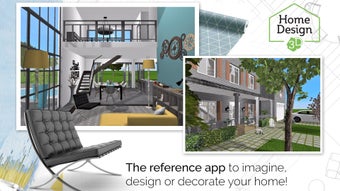
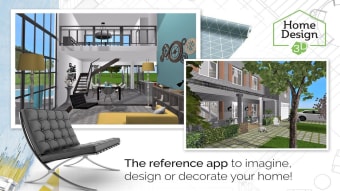
Home Design 3D is a snappy and intuitive house designing and remodeling tool. With a massive community comprising 35 million users across the world, this interior design reference app helps you achieve professional design results easily.

Working Mechanism

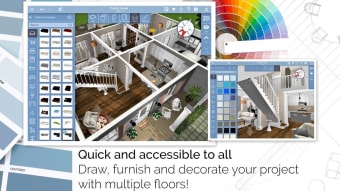
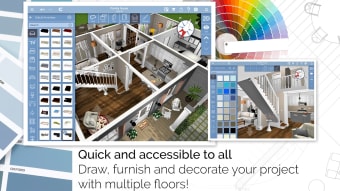
Home Design 3D lets you build a multi-story house right away. To get started, you must draw your plot, dividers and rooms, either in 3D or 2D. You may change the thickness or height of the walls, thereby creating corners. Thanks to the fully resizable joinery pieces, you may add windows, doors or openings to the house too.Your virtual house can have quite a few floors. However, if you opt for the Gold Plus variant, you may add any number of floors. Also, you can import the house’s blueprint, and share your projects through the cloud or email. Since the tool supports multiple platforms, you may export a partially finished project and resume it on another device.

Furnishing and Decoration

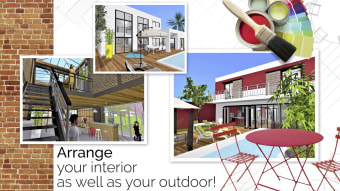
Home Design 3D lets you furnish and embellish both the external and internal attributes of your house. Make judicious use of the several thousand furniture pieces, textures and objects, and customize the décor to express your style. Also, you may edit any item by changing its color, size, and position. If things don’t go as per plan, the redo/undo feature shall help make amends. Once you’re done, you may take a real-time look at the house in 3D. While you’re at it, you may also take a look at the neighborhood.

Joe Wainer

    Joe Wainer is a content writer with a strong interest in technology and software. He enjoys exploring new apps, games, and tools, translating his findings into reviews that are clear and accessible. His background also includes coding projects, adding practical insight to his evaluations.

    • Pros

      • Simple and surprisingly versatile
      • Real-time 3D view
    • Cons

      • No basement function
      • No copy-paste option
     0/8

    App specs

    Also available in other platforms

    Program available in other languages


    Icon of program: Home Design 3D

    Home Design 3D for PC

    • Paid
    • 3.6
      297
    • 87.5K
    • Vvaries-with-device

    User reviews about Home Design 3D

    Have you tried Home Design 3D? Be the first to leave your opinion!

    Add review

    You may also like

    Alternatives to Home Design 3D

    Explore Apps

    Latest articles

    Laws concerning the use of this software vary from country to country. We do not encourage or condone the use of this program if it is in violation of these laws.
    Softonic

    Is Home Design 3D safe?

    Score result: Clean

    This file passed a comprehensive security scan using VirusTotal technology. It is safe to download.

    • Virus free
    • Spyware free
    • Malware free
    • Verified by Security Partners

      VirusTotal logo

    Scan Info

    Last scan
    Thursday, November 16, 2023
    Scan provider
    VirusTotal

    Softonic security commitment

    Home Design 3D has been thoroughly scanned by our advanced security systems and verified by industry-leading partners. This file comes from the official developer and has passed all our security checks, showing no signs of viruses, malware, or spyware. For more information, visit our Security and Trust Center